Amazon CloudFront
Amazon CloudFront can deliver its access logs to an Amazon Data Firehose stream, and Firehose can forward them to Ahrefs over HTTPS. You create the stream and enable the log delivery in your own AWS account, from the AWS console; Ahrefs never needs access to it.
Prerequisites
- A CloudFront distribution serving the domain of your Ahrefs project.
- Permissions in that AWS account to create a Firehose stream, an S3 bucket and an IAM role, and to edit the distribution's logging settings.
- The Firehose stream must be created in the US East (N. Virginia)
us-east-1region. CloudFront only delivers standard logs to Firehose streams in that region, whatever region your origin is in.
Step 1 — Get your endpoint URL and access key
- In Ahrefs, go to Project Settings → Bot Analytics for your project.
- Select Amazon CloudFront.
- Copy the HTTP endpoint URL and the access key shown on the page. The access key identifies your project; treat it like a password.
The endpoint URL is the same for everyone:
https://analytics.ahrefs.com/api/aws_cloudfront/logs
Step 2 — Create the Firehose stream
In the AWS console, switch to the US East (N. Virginia) region, open Amazon Data Firehose and click Create Firehose stream.
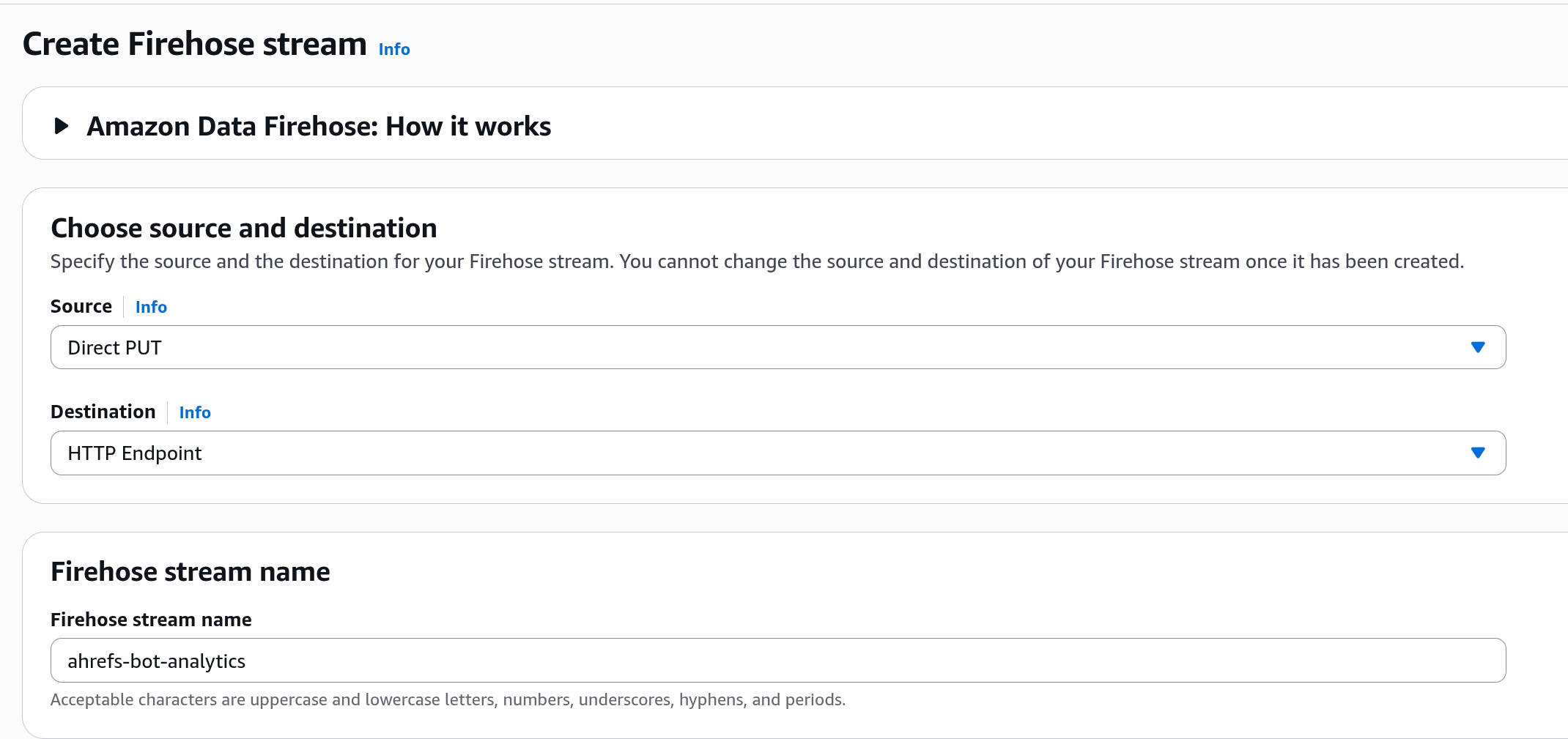
Choose source and destination
Set Source to Direct PUT and Destination to HTTP Endpoint, then give the stream a name such as ahrefs-bot-analytics. Source and destination cannot be changed after the stream is created. Leave the Transform records section as it is.
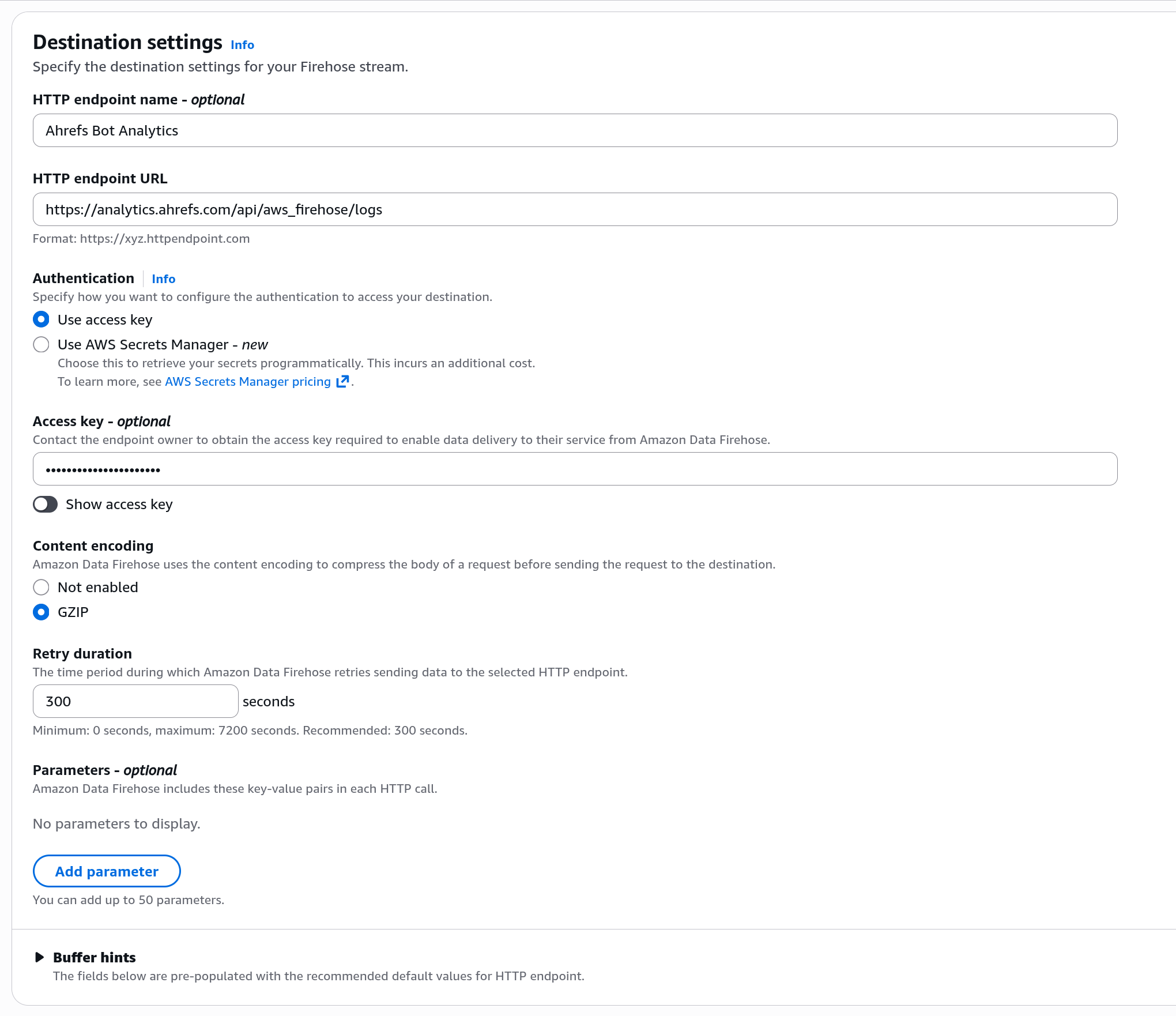
Destination settings
- HTTP endpoint name:
Ahrefs Bot Analytics - HTTP endpoint URL: the URL from Step 1
- Authentication: Use access key, and paste the access key from Step 1 into Access key
- Content encoding: GZIP
- Retry duration:
300seconds - Parameters: leave empty
- Buffer hints: keep the defaults
warning
The access key is the only thing that ties the stream to your Ahrefs project. Each Ahrefs project needs its own Firehose stream with its own access key; several distributions serving the same project can share one stream.
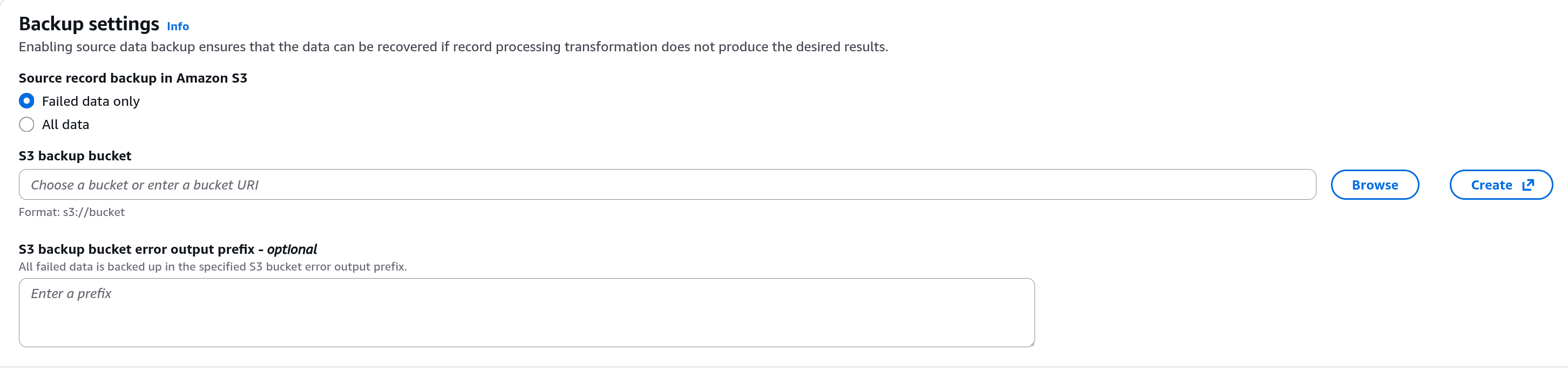
Backup settings
Under Source record backup in Amazon S3 choose Failed data only, then Browse to an existing S3 bucket or Create a new one. Firehose writes there any batch that Ahrefs could not accept, together with the reason, so this bucket is the first place to look when troubleshooting.
Advanced settings
Expand Advanced settings, set Amazon CloudWatch error logging to Enabled, and under Permissions let the console create a new IAM role. Click Create Firehose stream and wait until the stream's status is Active.
Step 3 — Send CloudFront logs to the stream
- In the CloudFront console, open Distributions and select your distribution.
- On the Logging tab, under Standard log destinations, click Add.
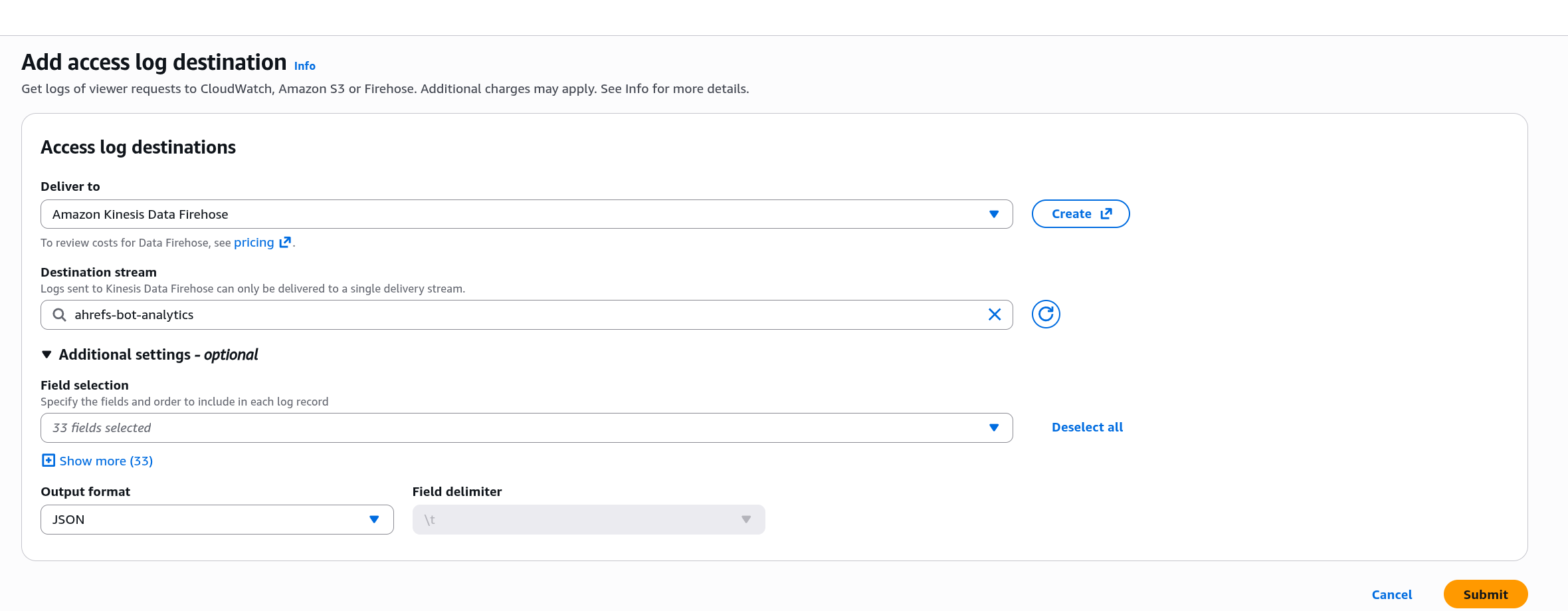
- On the Add access log destination page, set Deliver to to Amazon Kinesis Data Firehose and pick your stream under Destination stream.
- Expand Additional settings:
- Field selection: select the fields listed under Log fields. Keeping all 33 fields selected also works.
- Output format: JSON. Other formats are not accepted.
- Click Submit. CloudFront applies logging changes within a few minutes.
Log fields
Ahrefs needs a timestamp, c-ip, x-host-header, cs-uri-stem and cs(User-Agent). The recommended selection is:
timestamp(ms) date time c-ip x-forwarded-for cs-method x-host-header cs-protocol
cs-protocol-version cs-uri-stem cs-uri-query cs(User-Agent) cs(Referer) sc-status sc-bytes
sc-content-type time-to-first-byte time-taken x-edge-result-type x-edge-request-id
x-edge-location c-country asn
timestamp(ms), c-country and asn are in the field picker's real-time subset. They are optional: without timestamp(ms) Ahrefs uses date and time, with one-second precision.
Step 4 — Verify
CloudFront delivers standard logs in batches, usually within an hour of the requests and reliably about four hours after you enable logging. Firehose then forwards each batch within its buffer interval.
- In the Firehose console, the stream's Monitoring tab shows
IncomingRecordsonce CloudFront starts delivering, andDeliveryToHttpEndpoint.Successonce Ahrefs accepts the batches. - In Ahrefs, the Bot Analytics report fills in as bots visit your site.
Troubleshooting
If deliveries fail, Firehose retries for the retry duration and then writes the batch to your backup bucket under the http-endpoint-failed/ prefix, with the error message returned by Ahrefs. The same message appears in the stream's Destination error logs tab.
| Error message | Cause |
|---|---|
missing authentication header | The access key field in the Firehose destination is empty. |
invalid authentication | The access key does not match an Ahrefs project. Copy it again from Step 1. |
records are not JSON: configure CloudFront standard logging (v2) with output format JSON | The delivery's output format is not JSON, or the stream receives CloudFront real-time logs. Only standard logs in JSON are supported. |
Response … must contain a 'content-type: application/json' header … 404 | The endpoint URL is misspelled. Compare it with the URL in Step 1. |
Disabling
- In the CloudFront console, on the distribution's Logging tab, select the Firehose destination and delete it. This stops the log delivery.
- Delete the Firehose stream, and the backup bucket if you no longer need it.
- In Ahrefs, disable Amazon CloudFront in Project Settings → Bot Analytics.
Deleting the destination keeps the distribution's delivery source in CloudWatch Logs. That is harmless, and it is reused if you enable logging again.
info
CloudFront real-time logs (delivered through Kinesis Data Streams) are not supported. Use standard logging (v2) with JSON output as described above.