How it works
Ahrefs Connect lets your app access Ahrefs API data on behalf of a user who connects their Ahrefs account to your product.
Here’s the basic flow:
- Your app integrates with Ahrefs API via OAuth.
- A mutual user with a paid Ahrefs subscription connects their account to your app.
- Your app requests Ahrefs data on behalf of that user.
- Each request consumes API units from that user’s monthly allowance.
- You process, store, and display that data in your app for that user.
Eligibility requirements
To join Ahrefs Connect, your app must:
- Be a publicly available product with an existing user base. If you need Ahrefs data for personal or internal use, you should use the Ahrefs API directly instead.
- Not directly compete with Ahrefs or copy our functionality.
- Request data only on behalf of individual Ahrefs users with paid accounts. Ahrefs Connect is not designed for products that want to display Ahrefs data to a general audience without each viewer being an Ahrefs user.
Process
1. Application
Submit the application form with:
- A description of your product
- A link to your website
- Details on how you plan to use Ahrefs data in your app
Our Enterprise team will confirm if your product is eligible, explain the process, and provide assistance.
2. Enterprise plan
If you are building a new integration (not part of the legacy program), you will need an Ahrefs Enterprise plan to activate your integration in production.
- You do not need the plan during development.
- It is required to enable the integration for live users.
Our sales team will guide you through this step.
3. Development
Once you’re set up, you’ll find your Ahrefs Connect section in Account settings. This page provides details for the OAuth implementation:
- Client IDs and secrets
- Fields to set Redirect URIs for staging and production environments
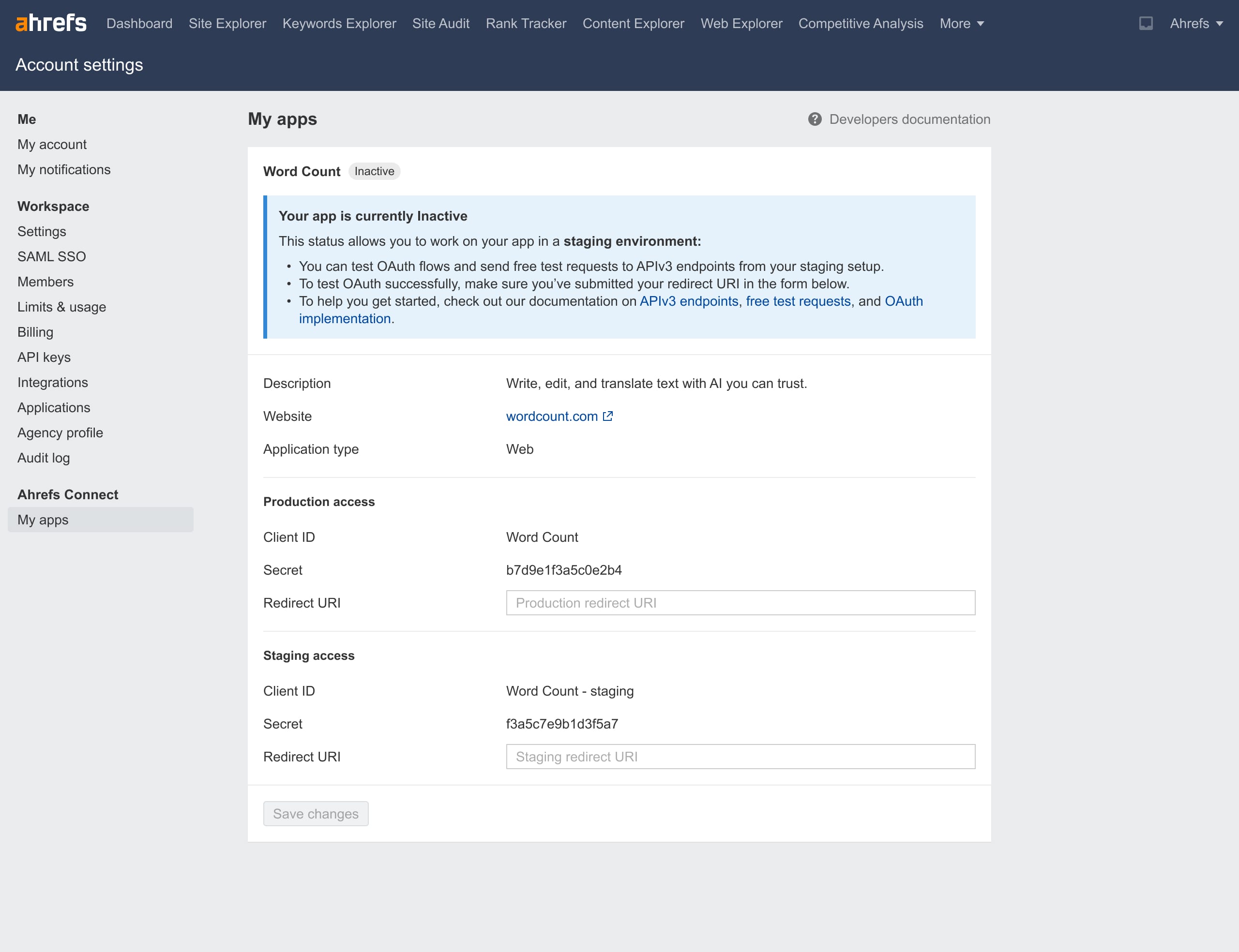
At this stage, your app status will be Inactive, allowing you to:
- Test OAuth flows in your staging environment
- Make free test requests to API v3 endpoints
Resources:
For any questions during development, contact [email protected] or the sales manager you’ve been in touch with.
4. Review
When development is complete, notify our support or sales team. They will provide submission instructions and details on the approval requirements.
More info: Approval process
5. Activation
Once approved, your app switches to Active. This enables:
- Live OAuth connections for Ahrefs users in production
- Full access to API requests in production
Our sales team can also add your app to the Apps Gallery so users can easily find it. This requires providing additional listing details: Apps Gallery guide
info
For legacy integration app developers
If your app already works with our legacy Integrations program:
- No need to apply: You are automatically migrated into Ahrefs Connect. You should already see the new section in Account settings and can start developing with API v3.
- No need for Enterprise subscription: As a valued long-time partner, you are not required to subscribe to Enterprise to activate your app.
- Same remaining steps: Development, review, and activation follow the same process as for new apps.
- Migration details: See For legacy app developers for more on moving from the old API v2 to the new API v3 system.